lgs-96
LGS-96
Read this in other languages:
- :it: Italian
LGS-96 is an unofficial browser extension that shows salary information found in
LinkedIn job postings directly on the job cards in the search results.
The purpose of this project is to save you time by letting you skip the job opportunities you may not be
interested in from a salary standpoint.
The extension takes its name from the Italian transparency decree D.Lgs. 96/2026, which requires salary
ranges to be published in job postings. A significant amount of companies, though, keep omitting it.
LGS-96 is not affiliated with, endorsed by, or connected to LinkedIn in any way.
Features
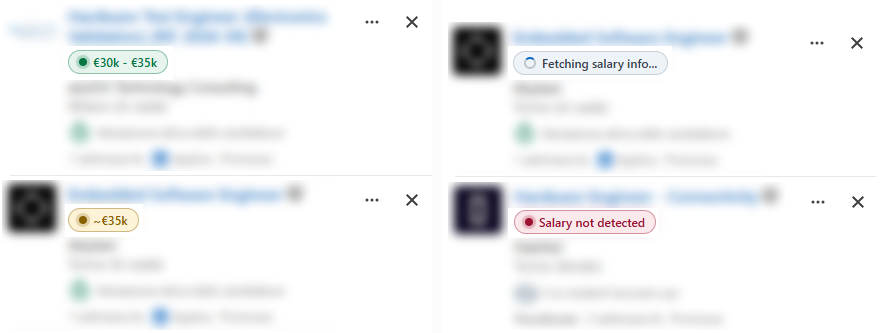
- A compact badge on each LinkedIn job card summarizes what the posting contains:
- :green_circle: green: a narrow salary range,
- :yellow_circle: amber: a broad range or a single approximate value,
- :red_circle: red: no salary information detected in the posting,
- :white_circle: grey: the check is pending, or it could not be completed due to errors or exceptions.
- When a card has no salary text on its own, the extension reads the public job description (rate limited, with backoff) and extracts the salary range from its text, with regional currency defaults and support for English and Italian postings.
- Request frequency setting (Slow / Average / Fast) controls the delay between requests to avoid being rate-limited on LinkedIn.
- Local cache of parsed results (3 days, can be disabled and cleared from the popup).
- English and Italian interfaces.
- Hover any badge and use the flag to report an incorrect result.
Install the extension
From the Chrome Web Store / Firefox Add-ons portal (recommended)
Download the Chrome version from here!
Download the Firefox version from here! Thanks to davidetarsi for adding Firefox support.
From source
Chrome
- Download or clone this repository.
- Open
chrome://extensionsin Chrome. - Enable Developer mode (top right).
- Click Load unpacked and select the
extension/folder.
Firefox
- Download or clone this repository.
- Open
about:debugging#/setupin Firefox. - Run
scripts/package.jswithnode. - Load
dist/lgs-96-X.X.X-firefox.zip(latest version) inside the This Firefox tab.
How to use it
You can access the extension settings by clicking its icon in the top-right corner:
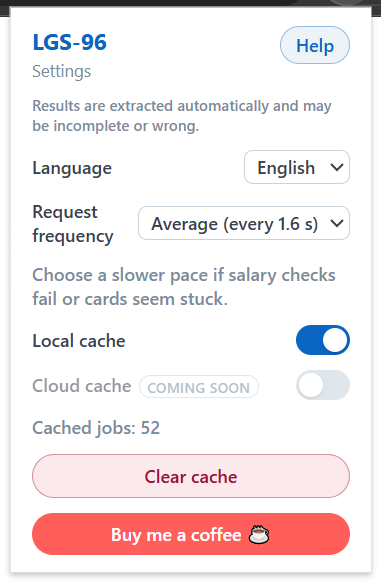
- Language: select one of the supported languages. At the moment, only English and Italian are supported. Defaults to English.
- Request frequency: defines the minimum timeout between two consecutive requests to LinkedIn’s API to retrieve the job description text. It has no effect on the speed of retrieval from the local cache. Change this to a higher value if you experience rate-limiting. Options are Slow (2.5 s), Average (1.6 s), and Fast (1 s).
- Local cache: to save time, job scanning results of the last 3 days are saved in a local cache. When you see the same card again, the result is fetched from the local storage instead of LinkedIn’s API.
- Cloud cache: a feature I may add in the future. It consists of a centralized cache to which each user of the extension can contribute.
- Clear cache: pressing this button will empty the local cache without a confirmation dialog.
- Buy me a coffee: the most important feature in the extension - it sends you to my Ko-Fi page :heart:
Just browse LinkedIn to see the magic happen!
The currently supported pages are:
linkedin.com/jobs/(works on the 1-3 job cards shown at the beginning of the page)-
linkedin.com/search/results/all/(works on the Jobs tab) linkedin.com/jobs/collections/recommended
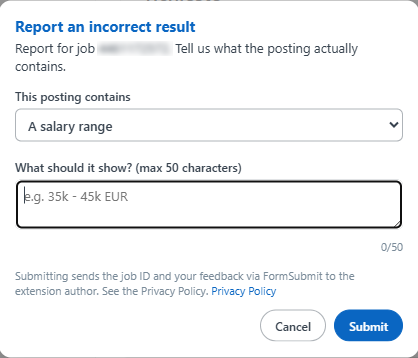
If you find a job description that the extension fails to read correctly, you can report it to me by hovering over the colored badge and clicking on the flag on the left. In the popup that opens, you can write the information that the extension should have shown.
Privacy
The extension stores only parsed results and your preferences in your browser’s
local extension storage.
Job descriptions are parsed transiently in memory and are never stored or sent anywhere.
The only network destinations are LinkedIn (public
job-posting pages, exactly as your browser would) and, when you explicitly submit a
report, the FormSubmit email relay service.
See PRIVACY.md for the full privacy policy.
Development
Features
The project consists entirely of dependency-free plain JavaScript. Run the test suite with:
node --test tests/salary-parser.test.js tests/cache.test.js tests/scheduler.test.js tests/feedback.test.js tests/localization.test.js tests/routes.test.js tests/fixture-cards.test.js tests/fixtures-sanitized.test.js tests/cloud-cache.test.js
Utility scripts:
node build-firefox-manifest.js- builds the Firefox manifest.node scripts/generate-locales.js— buildsextension/_locales/from the YAML localization files inextension/localization/.node scripts/sanitize-fixtures.js— sanitizes the HTML fixtures inpages/to make them completely anonymous (strips scripts, tracking parameters and profile handles).node scripts/package.js— builds the release ZIPs indist/and displays its hash.
Languages
You can make PRs to add support for an additional language, adding a YAML file in extension/localization/.
Additionally, to improve the extension’s ability to recognize text in the new language, append some common sentences you find in job descriptions to train/salary.json. Entries should include sentences with salary information and the expected results.